407-248-1481

QuoteWerks Customer Area
What's New
Current Release: v24.0 build 2.04 (released 04/17/2024) update center

Product Roadmap: Coming Soon!
You've asked, we've listened. The following projects are actively in development:
- New Integration: HaloPSA
- QuoteValet: Multiple Signatures
- Secondary Contacts! The built-in QuoteWerks contact database will now have the ability to have multiple contacts per company in the database. This feature will be available in the Professional and Corporate Editions only.
- QuoteWerks Web: Procurement (Phase 1). The Purchasing tab, displaying products to order, filtering them, ability to create manual Purchase orders, and all the right click menus. The Purchase orders tab, displaying POs, filtering them, ability to see PO Item details, and will include support for the majority of the right click menus. A later phase will include real-time Order Status and the ability to place Online Orders similar to QuoteWerks Desktop.
- QuoteWerks Web: The ability to send Purchase Orders to ConnectWise PSA, Autotask, and QuickBooks Online similar to QuoteWerks Desktop.
- QuoteValet: Unified QuoteValet Setup for both QuoteWerks Web and QuoteWerks Desktop.
Completed Projects:
✔ QuoteWerks Web: Configurator Setup
Do you have a feature request? Please make sure to post it to our forum.
April 17, 2024

Build Release: v24 Build 2.04. Some Highlight features include
QuoteWerks Web Configurator Setup,
USA Sales Tax Rate Lookup Enhancements,
Ingram Micro JSON API for Real-time P & A,
ConnectWise PSA Required Opportunity Fields,
new QuickBooks Online 'Ship To' Customer options,
and much more.
See the complete list of features.
November 30, 2023
QuoteWerks Version 24 Release


Address Verification
USA Address verification is now supported for QuoteWerks Realtime module users. On the SoldTo/ShipTo tab of the Quote WorkBook, there is now a button to verify and standardize the address.Do you manually type Addresses into QuoteWerks? Are the Addresses in your CRM always accurate? Have you ever forgotten to include a Suite number? With the Address Verification feature, these issues are in the past. Addresses will be more accurate and with all of the required shipping details before creating the new contact in your CRM, sending the quote to the customer, or your tech tries to arrive onsite.


Zip+4 Based Sales Tax Rates
The USA Sales Tax Rate Lookup in the Real-Time module has been improved. Now, the feature will verify the address against the USPS database, and refine the Postal Code to be a Zip+4 postal code. This pinpointed Zip+4 Postal Code will retrieve the Sales Tax Rate for that specific Zip+4 location.Do all of your addresses in your CRM have the Zip code +4 digits (also known as the 9-digit zip code)? In most cases, they do not. This is required to retrieve the most accurate Sales Tax information for the address you are quoting. QuoteWerks can now do this for you. There is no need to select from a list of tax rates because now you will have the tax rate for that specific address rather than just the 5-digit postal code.

Auto Address Fix and Realtime Sales Tax Retrieval
Your US addresses can automatically be fixed, and the sales tax rate can automatically be retrieved when the contact is retrieved from your CRM using the QuoteWerks Realtime module. You no longer need to remember to re-select and search for the correct Sales Tax Rate.
Whole Document Spellcheck
QuoteWerks now supports whole document spell check – not just individual fields. Pressing the F7 key while in a text box will display the traditional spell-check dialog. Choosing the Tools->Spelling menu (or CTRL-F7) will run the Whole Document Spell Check wizard. A wizard will be displayed that presents each field one by one, indicating misspelled words. The Whole Document Spellcheck can include fields on the Quote WorkBook tabs, and also line item columns for each line item. Each QuoteWerks user can customize the fields to spellcheck in the QuoteWerks Document.
QuoteWerks Web Azure SSO
QuoteWerks Web now supports Microsoft Azure SSO (Single Sign On) for Authentication in addition to the existing text message 2FA capability, Authenticator Apps (Google, Microsoft, etc) and Duo Multifactor Authentication (MFA).Do you use QuoteWerks Web and also have a Microsoft Azure Domain? You can now log into QuoteWerks Web using Single Sign On (SSO) with Microsoft Azure.

Etilize Recent Searches
When using the Product Content Subscription on the Product Lookup window, the Etilize keyword search box now has a drop-down list of your most 20 recent searches.Have you ever added items to your quote from Etilize searches but couldn't remember the search terms you used? Your most recent searches will now be available to you.

Deposit Amount Features
Shipping and Sales Tax can now be factored in for the Deposit Amount calculations.Does your Deposit Amount need to include not only a proportion of the line items but also the sales tax and shipping amount? These can now be included in the QuoteWerks Deposit Amount calculations.
August 4, 2023
Build Release: v23 Build 5.08. Some Highlight features include
multiple contacts for vendors,
enhancements to emailing Purchase Orders to Vendors,
additional QuoteWerks Web sync options for Literature and CoverPages,
and more.
This build also includes CRM/PSA and Accounting improvements for
QuickBooks,
Autotask,
GoldMine,
SugarCRM,
and much more.
See the complete list of features.
June 30, 2023

New Webinar Recording: QuoteWerks Web Overview Webinar
 From this webinar, you can learn first-hand the ease of the QuoteWerks Web add-on. QuoteWerks Web offers a convenient login process via QuoteWerks.com, eliminating the need for installations on sales reps' devices. Users can access existing quotes, create new ones, or start from templates. The interface is familiar to QuoteWerks desktop users, enhancing productivity. Line items can be easily managed, grouped, and modified. It provides access to native and linked product databases, including Etilize for subscribers. Delivery options include email and QuoteValet for electronic acceptance, signatures, and payments. The platform integrates with CRM, PSA, QuickBooks Online, distributors, and more.
From this webinar, you can learn first-hand the ease of the QuoteWerks Web add-on. QuoteWerks Web offers a convenient login process via QuoteWerks.com, eliminating the need for installations on sales reps' devices. Users can access existing quotes, create new ones, or start from templates. The interface is familiar to QuoteWerks desktop users, enhancing productivity. Line items can be easily managed, grouped, and modified. It provides access to native and linked product databases, including Etilize for subscribers. Delivery options include email and QuoteValet for electronic acceptance, signatures, and payments. The platform integrates with CRM, PSA, QuickBooks Online, distributors, and more.
June 12, 2023
New Feature Video: Visually Organize Your Documents and Display in QuoteWerks Web
 Did you know that you can have multiple documents open at the same time in QuoteWerks Web? You can even Tile, Cascade, and arange them to assist you in the quoting process. You can quickly minimize all of them and change the background image on your QuoteWerks Web 'Desktop'.
Did you know that you can have multiple documents open at the same time in QuoteWerks Web? You can even Tile, Cascade, and arange them to assist you in the quoting process. You can quickly minimize all of them and change the background image on your QuoteWerks Web 'Desktop'.
May 7, 2023
Build Release: v23 Build 4.05. Some Highlight features include consumer pricing for Newegg and Provantage (again) for Product Content Subscribers, added functionality for Configurations, QuoteWerks Web enhancements, and more.
This build also includes CRM/PSA and Accounting improvements for
GoldMine,
Act! For Web,
Act!,
SugarCRM,
and much more.
See the complete list of features.
March 3, 2023
Build Release: v23 Build 2.01. Some Highlight features include Autotask as a Secondary CRM, added functionality for Bundles, Required Items, Optional Items, and Substitute Items, and more.
This build also includes CRM/PSA and Accounting improvements for
GoldMine,
Act For Web,
HubSpot,
SugarCRM,
QuickBooks Desktop,
and much more.
See the complete list of features.
December 1, 2022

QuoteWerks Community Update: QuoteWerks Version Numbering Change
 Last year, we released QuoteWerks version 5.7. This year, the next version is version 23.
What's with the version numbering change?
Last year, we released QuoteWerks version 5.7. This year, the next version is version 23.
What's with the version numbering change?
learn more...
November 28, 2022
QuoteWerks Version 23 Release

QuoteWerks Web Multi-Factor Authentication
QuoteWerks Web now supports Authenticator Apps (Google, Microsoft, etc) and Duo for Multifactor Authentication (MFA) in addition to the existing text message 2FA capability.
QuoteValet Custom URL
Your QuoteValet URL can now have a custom CNAME. So, instead of www.quotevalet.com, the URL could be yourcompany.quotevalet.com. This helps with your branding, especially for customers not familiar with QuoteValet.
Text Library
For Memo fields, the F2lookup now lets you store a text library of large chunks of text that are searchable enabling you to easily compose your statements of work, terms and other text intensive composition.
Find and Replace
Replace has been added to the Edit->Find feature. You can find and replace across all line items or in a specific column. In addition to specific values, you look for empty cells, profit margin above or below a certain value, and more.
Data Manager - Advanced Import and Export
You can now Import and Export Bundles, Configurations, Required Items, Optional Items, Substitute Items. This functionality enables you to easily modify Bundles and Configurations like replacing outdated part numbers simply by exporting, modifying, and re-porting the data. You can now share Bundles and Configurations between different QuoteWerks installations and companies.
Data Manager – Mass Update
Use this feature to increase prices by a percentage for all fixed price products in a native product database.
ADI Integration
See your ADI parts, pricing, and availability in QuoteWerks. ADI Pricing and Availability is available in the Realtime Module. Our new ADI integration includes the PartLocator service. Through the PartLocator service, you are able to search for ADI parts. ADI provides us with a current complete list of all of their parts on a weekly basis.
Quote Expirations with Time
You can now specify a time for your quote expiration. As an example, this is useful for specifying that a quote expires at 5pm on a certain day.
Purchase Order Status Customer Notifications
You can now store and organize even more information in the QuoteWerks Purchase Order. There is a PO Confirmed field you can use when you have received confirmation that your order has been received. PO items now have an ETA date to help you manage customer expectations.With this information, you can click a button and have order status emails automatically sent to your customers about the items ordered for them on the purchase order including order tracking numbers, and more. Templates are fully customizable. This is a huge time saver and reduces many of the "where is my order?" type of questions you receive by email and phone from your customers.

Autotask as a Secondary CRM
For Autotask users, Autotask can now be used as a Secondary CRM. This makes it possible for you to use your Primary CRM to create quotes, then when the Quote becomes an Order, then you can use the Secondary CRM feature to integrate the Order including creating the customer, opportunity, products, etc. in the Secondary Contact Manager. We first introduced the ability for ConnectWise PSA (formerly Manage) customers to use a solution like Hubspot or other CRM that is more suited for tracking the sales process, and now have added this functionality for Autotask users.
Find Child Items
On the Bundles, Configurations, Required Items, Optional Items, and Substitute Items windows you can now easily see the Child Items for each of the above as you select it. You can also search for an Item Manufacturer Part Number making it much easier to find items you are looking for within bundles, etc.
Multiple Contacts for Vendors
Multiple contacts for Vendors! On the Vendors window, you can search for a company or contact. You can indicate which contact is the primary contact for the vendor, and automatically include the vendor contact's email address as a TO or CC when "Emailing a PO to the vendor" or in a "Vendor RFQ notification."
Autotask Enhancements
For Autotask users, Opportunities can now be created that are attached to an Account vs a Contact, and when updating or creating a new Opportunity the Category can be specified. When retrieving products from Autotask into QuoteWerks, more fields are available like InternalProductID, BillingType, and more. When retrieving Autotask Products, Services, Service Bundles, and Labor, there is a new option to base the tax code on the Material Code, Tax Category, and Tax Region.
QuickBooks Desktop Customer Sales Tax Rate
For QuickBooks Desktop Users, if you use QuickBooks as your Contact Manager, there is now a DataLink field for Tax Rate which will pull the sales tax rate specified for the customer in QuickBooks into your QuoteWerks quote.
QuoteWerks Web Auto-Sync
Changes to Literature and Cover pages are now immediately synced to QuoteWerks Web just like when creating, editing, renaming, cloning or deleting a layout on the Print window (added in v23 build 3). October 21, 2022
New Webinar Recording: QuoteWerks v5.7 Builds 3 and 4 Release
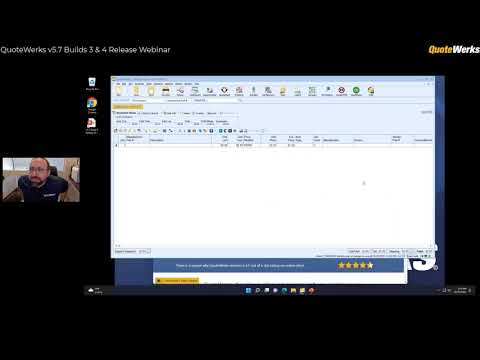 See all of the new features we added in QuoteWerks v5.7 Builds 3 and 4. Over 50 new features!
See all of the new features we added in QuoteWerks v5.7 Builds 3 and 4. Over 50 new features!
September 21, 2022
Build Release: v5.7 Build 4.11. Some Highlight features include Re-Upload Options for QuoteValet Users, Arrow Electronics Quote Import functionality, support for New Blue Star USA APIs, Blue Star Canada, support for New ScanSource APIs, QuickBooks Desktop 2023 Support, and more.
This build also includes CRM/PSA and Accounting improvements for
GoldMine,
HubSpot,
ConnectWise Manage,
Act For Web,
QuickBooks Desktop,
and much more.
See the complete list of features.
June 22, 2022
Build Release: v5.7 Build 3.16. Some Highlight features include a completely redesigned Act! For Web integration, the ability to show/hide toolbar icons, more 'Save as PDF' options, and more.
This build also includes CRM/PSA and Accounting improvements for
GoldMine,
SugarCRM,
ConnectWise Manage,
Microsoft Dynamics CRM,
QuickBooks Online,
and much more.
See the complete list of features.
April 14, 2022
New Tutorial Video: Introduction to Sending RFQs with VendorRFQ
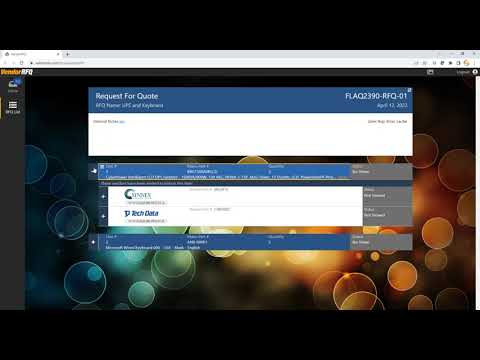 VendorRFQ is an integrated solution enabling you to communicate with your vendors, discuss and negotiate pricing, and award the winning bid all in one place.
VendorRFQ can be accessed from both QuoteWerks Desktop and QuoteWerks Web. In this video we will show you how easy it is to use the basics of VendorRFQ with QuoteWerks Desktop.
VendorRFQ is an integrated solution enabling you to communicate with your vendors, discuss and negotiate pricing, and award the winning bid all in one place.
VendorRFQ can be accessed from both QuoteWerks Desktop and QuoteWerks Web. In this video we will show you how easy it is to use the basics of VendorRFQ with QuoteWerks Desktop.
VendorRFQ is an integrated solution enabling you to communicate with your vendors, discuss and negotiate pricing, and award the winning bid all in one place.
VendorRFQ can be accessed from both QuoteWerks Desktop and QuoteWerks Web. In this video we will show you how easy it is to use the basics of VendorRFQ with QuoteWerks Desktop.
February 11, 2022
Build Release: v5.7 Build 2.40. Some Highlight features include AutoRecover, Stripe Checkout, POItem Custom Fields, more Refresh Item Details options, and more.
This build also includes CRM/PSA and Accounting improvements for
Autotask,
SugarCRM,
ConnectWise Manage,
QuickBooks Online,
and much more.
See the complete list of features.
November 29, 2021
QuoteWerks Version 5.7 Release
VendorRFQ
Integration with VendorRFQ which enables customers to communicate with their vendors, discussing and negotiating pricing and details for goods and services, collecting and organizing this information from one or all of their vendors.
Reporting on POs, Payments, and more…
Management Reports capabilities have been greatly expanded. In addition to reporting on the Documents and Product Databases, you can now create management reports on Purchase Orders (purchasing), Payments, Contacts, Vendors, Bundles, Configurations, Required Items, and Optional Items.
Product Sourcing Panel
What used to be the "Etilize panel" now will show product sourcing information even if you do not have an Etilize subscription. This will show any product data source matches and any Vendor RFQs for the selected item.
Amazon Business Pricing
See your Amazon Business pricing in QuoteWerks! You are no longer limited to the generic Amazon website pricing.
Zoho CRM Quotes & Products
Your line items in QuoteWerks can now be sent to Zoho CRM. With this option feature, create quotes in Zoho CRM that are associated with the Zoho CRM Deal. These Quotes are populated with line item detail from the QuoteWerks quote.
Etilize Product Profile Matrix
Apply Customer / Product Profile Matrix pricing to products that you quote from Etilize. This enables you to apply different price modifiers to the same type of item for different types of customers. September 24, 2021
Build Release: v5.6 Build 5.12. Some Highlight features include the moving from files to the database for Product Import templates, Contact Import templates, Vendor Import templates, Paste Special templates, and Synchronization Profiles.
This build also includes CRM/PSA and Accounting improvements for SugarCRM,
Act!,
Act for Web ,
Sage 50 Accounting (Peachtree),
and much more.
See the complete list of features.
August 11, 2021
Build Release: v5.6 Build 4.06. Some Highlight features are QuoteValet Auto-calculations, New Company Auto-Links, More Macros, CRM/PSA improvements for ConnectWise Manage,
GoldMine,
HubSpot CRM,
Maximizer CRM,
Zoho CRM, and much more.
See the complete list of features.
August 4, 2021
New Tutorial Video: QuoteWerks Bundles - Basics
 In this video, you will learn how to create kits and bundles in QuoteWerks.
By using this powerful feature you with be able to save a tremendous amount of time by being able to add a group of items to your quote with just one click.
QuoteWerks offers two types of Bundles: Simple and Grouped. In this video, you will learn the differences between the two.
This video also includes all of the new/updated features added recently including Group Bundles Vendor Partnumber, Custom Fields, Pictures, Price Override, and more!
In this video, you will learn how to create kits and bundles in QuoteWerks.
By using this powerful feature you with be able to save a tremendous amount of time by being able to add a group of items to your quote with just one click.
QuoteWerks offers two types of Bundles: Simple and Grouped. In this video, you will learn the differences between the two.
This video also includes all of the new/updated features added recently including Group Bundles Vendor Partnumber, Custom Fields, Pictures, Price Override, and more!
In this video, you will learn how to create kits and bundles in QuoteWerks.
By using this powerful feature you with be able to save a tremendous amount of time by being able to add a group of items to your quote with just one click.
QuoteWerks offers two types of Bundles: Simple and Grouped. In this video, you will learn the differences between the two.
This video also includes all of the new/updated features added recently including Group Bundles Vendor Partnumber, Custom Fields, Pictures, Price Override, and more!
May 7, 2021
New Training Video: QuoteValet - Branding and Customizations
 In this video from the 2021 QuoteWerks User Summit, we review the editing and customizing your QuoteValet templates.
Take a deeper dive into QuoteValet by learning how to customize the HTML/CSS, support Credit Card payments, and other important feature sets within QuoteWerks' electronic delivery tool.
In this video from the 2021 QuoteWerks User Summit, we review the editing and customizing your QuoteValet templates.
Take a deeper dive into QuoteValet by learning how to customize the HTML/CSS, support Credit Card payments, and other important feature sets within QuoteWerks' electronic delivery tool.
In this video from the 2021 QuoteWerks User Summit, we review the editing and customizing your QuoteValet templates.
Take a deeper dive into QuoteValet by learning how to customize the HTML/CSS, support Credit Card payments, and other important feature sets within QuoteWerks' electronic delivery tool.
March 31, 2021
Pain Point Webinar Series: Do you feel limited and constrained when editing your quotes?
 This webinar demonstrates how you can utilize features in QuoteWerks to quickly and efficiently update your quotes and use shortcuts to cut down on the time it takes to make edits.
This webinar demonstrates how you can utilize features in QuoteWerks to quickly and efficiently update your quotes and use shortcuts to cut down on the time it takes to make edits.
March 25, 2021
Build Release: v5.6 Build 3.20. Some Highlight features are New HubSpot CRM Integration, ACT! v23 support, Reporting enhancements, Edit Product in a Product Database from the Quote Workbook, and more.
See the complete list of features.
Febraury 15, 2021
Build Release: v5.6 Build 2.07. Some Highlight features are OAuth for Gmail/GSuite mail servers, OAuth for Microsoft Office 365 mail server, MAPI support for sending emails, Multiple Database Search for Etilize, Zoho CRM integration enhancements, MS Dynamics CRM integration enhancements, SugarCRM integration enhancements, and more.
See the complete list of features.
January 27, 2021
Pain Point Webinar Series: Is your procurement process too complicated?
 This webinar focuses on how you can easily use the QuoteWerks Purchasing Module to keep track of your procurement process.
This webinar focuses on how you can easily use the QuoteWerks Purchasing Module to keep track of your procurement process.
January 14, 2021
New Webinar Recording: QuoteWerks Year in Review for 2020!
 Start off 2021 by utilizing all the major features we released in 2020! During this webinar, we walk through the features that were added in the last year and how you can start using them to save time in 2021!
Start off 2021 by utilizing all the major features we released in 2020! During this webinar, we walk through the features that were added in the last year and how you can start using them to save time in 2021!
November 18, 2020
Pain Point Webinar Series: Having trouble keeping your team in the loop during the sales process?
 This webinar focuses on how to keep your entire team in the loop during the sales process.
By utilizing QuoteValet notifications, you can ensure your team is notified in each step of the sales process so no clients fall through the cracks.
This webinar focuses on how to keep your entire team in the loop during the sales process.
By utilizing QuoteValet notifications, you can ensure your team is notified in each step of the sales process so no clients fall through the cracks.
November 11, 2020
QuoteWerks Version 5.6 Release

Layout, Cover Page, & Literature Access Rights
Enable access rights on cover pages, layouts, and literature files. Choose which users and groups can view and modify these files. Prior to this, all files were visible. Now you can specify which users see which documents.
Show/Hide Grid Toolbar Icons
Customize the grid toolbar to display shortcuts and features your company use. These per user settings make it easy to show/hide only features from the toolbar that are important to you.
Re-Export Purchase Orders
Re-export any Purchase Order sent to Autotask, ConnectWise, QuickBooks, or Sage 50 from QuoteWerks.
Sync Links Tab with QuoteWerks Web
Sync documents between QuoteWerks Web and QuoteWerks Desktop with the push of a button. Users in QuoteWerks Desktop can use the Refresh button on the Links tab or the Sync button on the Deliver window to push and pull documents between the Desktop and Web versions of QuoteWerks.
Tech Data and SYNNEX Quote Importers
Import SYNNEX and Tech Data quotes directly into QuoteWerks with a click of a button! Look up the quotes by quote number or see a list of existing quotes. Additionally, Tech Data uses also can now import CCW quotes from their Tech Data account directly into QuoteWerks.
Etilize Public Favorites
Etilize now includes a Public Favorites folder. Users can now save items in the Public favorites and any item saved in this folder will be available for anyone who uses Etilize in the company.
Folders for Etilize
The Public and My Favorites folders now include the ability to create folders and sub-folders. This makes it incredibly easy to organize the items you sell from Etilize.
Etilize Workspace for QuoteWerks Desktop
The Workspace allows users to save items from Etilize in a temporarily holding space without having to add it to your favorites until you decide whether to save it to your Favorites folders or not.
Accounting, CRM and PSA Support Updates
Support added for Maximizer CRM 2020 R2, MS CRM OAuth2 support, QuickBooks 2021, Sugar CRM 10.2 & 10.3, ConnectWise 2020.3 & 2020.4, Act! v23, and much more!
MAPI Support for Sending Emails
Support added for sending emails via MAPI. MAPI support is useful for those that do not use Outlook and do not want to send via SMTP - like Groupwise and Thunderbird.
OAuth 2.0 Authentication for Microsoft Office 365
Support added for OAuth 2.0 Authentication for sending emails via SMTP through the Microsoft Office 365 mail server.
OAuth 2.0 Authentication for Gmail
Support added for OAuth 2.0 Authentication for sending emails through Gmail/GSuite mail servers.
New HubSpot CRM Integration
QuoteWerks now supports HubSpot CRM! This integration enables users to search for contacts, create and update deals, upload quote attachments into HubSpot CRM, and full DataLink support. November 6, 2020
Feature Spotlight: Allow Customers to Change Quantities on QuoteValet
 QuoteValet allows you to set per line item if a customer can change quantities on the line item in QuoteValet. This will allow the Customer to change the Quantity of specified line item(s) while viewing the quote on QuoteValet.
Linked quantities on the quote will also follow these adjustments. As an example, if the customer increases the quantity of an item, the services associated with that item will also be adjusted accordingly.
QuoteValet allows you to set per line item if a customer can change quantities on the line item in QuoteValet. This will allow the Customer to change the Quantity of specified line item(s) while viewing the quote on QuoteValet.
Linked quantities on the quote will also follow these adjustments. As an example, if the customer increases the quantity of an item, the services associated with that item will also be adjusted accordingly.
You can control the ability to control the customer's ability to change an item's quantity by editing the item's Line Attributes.
QuoteValet allows you to set per line item if a customer can change quantities on the line item in QuoteValet. This will allow the Customer to change the Quantity of specified line item(s) while viewing the quote on QuoteValet.
Linked quantities on the quote will also follow these adjustments. As an example, if the customer increases the quantity of an item, the services associated with that item will also be adjusted accordingly.
You can control the ability to control the customer's ability to change an item's quantity by editing the item's Line Attributes.
October 22, 2020
Pain Point Webinar Series: Need to offer more flexible payment options?
 This webinar focuses on how and why you need to be able to offer flexible payment options for your customers.
We will discuss using multiple payment options such as credit card, ACH, PayPal, and more.
This webinar focuses on how and why you need to be able to offer flexible payment options for your customers.
We will discuss using multiple payment options such as credit card, ACH, PayPal, and more.
September 2, 2020
Pain Point Webinar Series: Struggling to get an overview of your sales performance?
 This webinar focuses on the challenges of seeing sales metrics easily and the status of quote and order documents during the sales process.
We will discuss using QuoteValet Insight and QuoteValet Dashboard.
This webinar focuses on the challenges of seeing sales metrics easily and the status of quote and order documents during the sales process.
We will discuss using QuoteValet Insight and QuoteValet Dashboard.
August 19, 2020
Pain Point Webinar Series: Spending Hours Retyping Vendor Quote Data Into Your Proposal?
 This webinar focuses on the challenges of entering external data from vendor quotes into your quote or proposal. From copying and pasting data into your quote and finding associated information, importing external data can be time consuming.
We will focus on the Paste Special Wizard, Dell Premier Portal Integration, Tech Data SAP Quote Importer and Ingram Micro Quote Importer.
This webinar focuses on the challenges of entering external data from vendor quotes into your quote or proposal. From copying and pasting data into your quote and finding associated information, importing external data can be time consuming.
We will focus on the Paste Special Wizard, Dell Premier Portal Integration, Tech Data SAP Quote Importer and Ingram Micro Quote Importer.
August 5, 2020
Pain Point Webinar Series: Struggling to Standardize Your Sales Reps' Quotes & Proposals?
 This webinar focuses on the challenges of standardizing your quotes and proposals from sales rep to sales rep within your company.
From forgetting important documentation, sales reps changing layouts, and quotes looking unprofessional, quote standardization can be difficult.
This webinar focuses on the challenges of standardizing your quotes and proposals from sales rep to sales rep within your company.
From forgetting important documentation, sales reps changing layouts, and quotes looking unprofessional, quote standardization can be difficult.
We focus specifically on the Delivery Window in QuoteWerks to solve these problems.
This webinar focuses on the challenges of standardizing your quotes and proposals from sales rep to sales rep within your company.
From forgetting important documentation, sales reps changing layouts, and quotes looking unprofessional, quote standardization can be difficult.
We focus specifically on the Delivery Window in QuoteWerks to solve these problems.
July 30, 2020
New Video: Version 5.5 Build 5 Release Webinar. This includes demonstrating the Ingram Micro Quote Importer, Kaseya BMS Integration, new Excel-like Grid Navigation, and much more!
July 22, 2020
Pain Point Webinar Series: Are You Losing Valuable Time Processing Routine Customer Re-orders?
 The challenges of creating customer re-orders and creating quotes can be overwhelming. Between the time it takes to create a quote, process the order, and the phone calls and emails in-between,
customer re-orders can be time consuming. Or maybe you have a promotion you want to share with your customers, but don't want to create a dedicated quote for each customer.
The challenges of creating customer re-orders and creating quotes can be overwhelming. Between the time it takes to create a quote, process the order, and the phone calls and emails in-between,
customer re-orders can be time consuming. Or maybe you have a promotion you want to share with your customers, but don't want to create a dedicated quote for each customer.
We focus specifically on the QuoteValet Shopping Cart to solve these problems.
The challenges of creating customer re-orders and creating quotes can be overwhelming. Between the time it takes to create a quote, process the order, and the phone calls and emails in-between,
customer re-orders can be time consuming. Or maybe you have a promotion you want to share with your customers, but don't want to create a dedicated quote for each customer.
We focus specifically on the QuoteValet Shopping Cart to solve these problems.
July 8, 2020
Pain Point Webinar Series: Spending too much time sourcing items from vendors?
 Vendor sourcing can be challenging. Sales teams have to search multiple vendor sites to compare pricing, then check stock from each vendor, and finally having to manually re-type that item and vendor information into the quote, while also have the awareness the customer is going to price-check every item. It's more important than ever for your team to offer the best solution for your customer the first time.
We focus specifically on the Real-time Module and Product Content Subscription (powered by Etilize) to solve these problems.
Vendor sourcing can be challenging. Sales teams have to search multiple vendor sites to compare pricing, then check stock from each vendor, and finally having to manually re-type that item and vendor information into the quote, while also have the awareness the customer is going to price-check every item. It's more important than ever for your team to offer the best solution for your customer the first time.
We focus specifically on the Real-time Module and Product Content Subscription (powered by Etilize) to solve these problems.
June 24, 2020
Pain Point Webinar Series: Obtaining Signed Agreements from Customers Taking Too Long?
 From your proposal getting stuck in SPAM, customers wanting changes in the document, waiting for the customer to print, sign and scan the document back, obtaining signatures can be difficult.
We will focus specifically on QuoteValet to solve these problems.
From your proposal getting stuck in SPAM, customers wanting changes in the document, waiting for the customer to print, sign and scan the document back, obtaining signatures can be difficult.
We will focus specifically on QuoteValet to solve these problems.
June 22, 2020
Feature Spotlight: Ingram Micro Real-time Quote Import
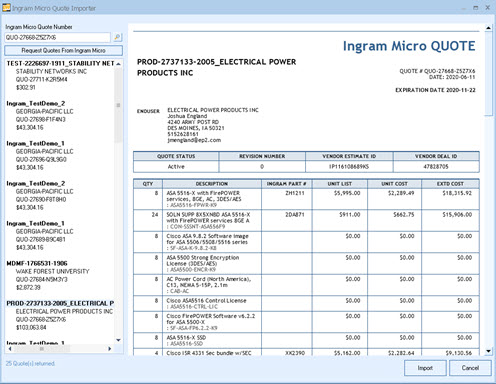 Easily select from a live list of Ingram Micro quotes or simply enter your Ingram Micro quote number and automatically import your entire quote from Ingram Micro. This is a real-time connection to Ingram Micro showing you available quotes from the last 45 days.
With this feature, there is no need to wait for an email from your sales rep and then try to copy and paste it into your quote - you just need to press a button.
Easily select from a live list of Ingram Micro quotes or simply enter your Ingram Micro quote number and automatically import your entire quote from Ingram Micro. This is a real-time connection to Ingram Micro showing you available quotes from the last 45 days.
With this feature, there is no need to wait for an email from your sales rep and then try to copy and paste it into your quote - you just need to press a button.
June 22, 2020
Build Release: v5.5 Build 5.03. Some Highlight features are New Kaseya BMS Integration, Ingram Micro Quote Importer, QuoteValet Payment Deposit or Full Amount, Autotask Product Categories, Apply Multi-Line Changes menu, and more.
See the complete list of features.
June 10, 2020
Pain Point Webinar Series: Sending Quotes & Proposals Full of Errors?
 From sales reps sending quotes with mistakes, sending quotes without management approval, margins too low, or missed items, sending quotes can be difficult.
We focus specifically on on Peer Reviews and Document Approvals to solve these problems.
From sales reps sending quotes with mistakes, sending quotes without management approval, margins too low, or missed items, sending quotes can be difficult.
We focus specifically on on Peer Reviews and Document Approvals to solve these problems.
May 27, 2020
Pain Point Webinar Series: Trouble Finding and Managing Your Quotes and Proposals?
 From sales rep saving documents in different locations, employees leaving, finding old quotes, and knowing which version of a quote you sent to your customer, managing documents can be difficult.
We focus specifically on finding documents through the Open Window and Document Revisions.
From sales rep saving documents in different locations, employees leaving, finding old quotes, and knowing which version of a quote you sent to your customer, managing documents can be difficult.
We focus specifically on finding documents through the Open Window and Document Revisions.
May 13, 2020
Pain Point Webinar Series: Chasing Customers for Payment
 We discuss the challenges of collecting payments from customers once the quote or proposal has been accepted.
We focus specifically on how to automate your payment collections.
We discuss the challenges of collecting payments from customers once the quote or proposal has been accepted.
We focus specifically on how to automate your payment collections.
April 22, 2020
Build Release: v5.5 Build 4.06. Some Highlight features are Aspire Hosted Database Subscription, Product Price History Averages, "Delete 0 Quantity Items from Document" button, and more.
See the complete list of features.
April 22, 2020
Pain Point Webinar Series: Tired of Creating Similar Quotes Over and Over?
 From creating the same quote repeatedly, starting from scratch or your sales reps don't know where to begin, quote creation can be time consuming.
We focus on how to utilize document templates to create quotes in a more streamlined and efficient way.
From creating the same quote repeatedly, starting from scratch or your sales reps don't know where to begin, quote creation can be time consuming.
We focus on how to utilize document templates to create quotes in a more streamlined and efficient way.
March 10, 2020
Build Release: v5.5 Build 3.08. Some Highlight features are Salesforce.com enhancements, Zoho CRM Product Source, UPS Negotiated Rates, and more.
See the complete list of features.
January 8, 2020
Build Release: v5.5 Build 2.03. Some Highlight features are Zoho Follow up calls for Deals, QuickBooks Online enhancements, SugarCRM 9.3 Support, and more.
See the complete list of features.
November 5, 2019
Allow Customers to Change Quantities on QuoteValet
You can set per line item if a customer can change quantities on QuoteValet. This will allow the Customer to change the Quantity of specified line item(s) while viewing the quote on QuoteValet. Linked quantities on the quote will also follow these adjustments. As an example, if the customer increases the quantity of an item, the services associated with that item will also be adjusted accordingly.
QuoteValet Customer Uploads
QuoteValet now supports the ability for customers to upload files to the QuoteValet Quote. This is helpful when customers such as municipalities need to upload a signed PO from their accounting department. This is also helpful when you have specific site documents or photos that need to be associated with the document. SalesReps also have the ability to upload files via the salesrep facing view of the QuoteValet document.
QuoteWerks Web Multi-Factor Authentication
When enabled, the user will be sent an authentication text message before they can login to QuoteWerks Web.
ConnectWise Manage Project Support
When winning a ConnectWise Opportunity, QuoteWerks can now convert all items or specified items (like project phases) on the Opportunity to a new or existing Project in ConnectWise Manage.
Accounting, CRM and PSA Support Updates
Support for ConnectWise 2019.5, SugarCRM 9.2, Goldmine 2019.1, and QuickBooks Desktop 2020 USA and Canada.
Deposit based on multiple factors
You can now collect a deposit on more than just one category of line item. As an example, you can now collect a deposit based on 100% of Services and 50% of Hardware. The deposit can still be a fixed amount, percentage of the overall document, or based on a single factor.
Grouped Bundle and Configuration Enhancements
Grouped bundles can now have a specified Unit Price override instead of just adding up the prices of the items contained in the bundle. Grouped Bundles and Configurations can now have Custom Fields and a picture.
More Custom Fields
The Quote WorkBook now has CustomMemo01, CustomMemo02, CustomMemo03, and CustomMemo04 to the Custom tab. Products now have 3 additional Custom Memo fields.
New Aspire Database Hosting Subscription
Utilizing the QuoteWerks Database Hosting has never been easier! Our new subscription can automatically rehost your QuoteWerks installation to our hosted database using the new Rehost Wizard. Additionally, both static and dynamic IP addresses are whitelisted automatically. This new subscription is faster, easier to setup, and licensed by user instead of by company site!
Ingram Micro Quote Importer
Ingram Micro customers from USA and Canada can now import Ingram Micro quotes directly into QuoteWerks! Search for a quote to import or lookup by quote number and instantly import the quote with all items and your cost into QuoteWerks!
Excel-Like Quote Sheet Grid Navigation
Navigate through the QuoteWerks Grid more fluidly. Quickly change fields utilizing common Excel shortcuts (such as tab and enter). Additionally, the text in the cell is auto-selected making it easier to replace all the text on the fly or use the HOME and END keys to move the cursor to the beginning or end of the text.
Apply Multi-Line Changes
Making edits in your quotes has never been easier or more efficient. Select multiple lines and change the selected lines vendor, quantities, pricing, and many other fields with a click of a button!
Kaseya BMS Integration
Integrate with Kaseya BMS with the new QuoteWerks written integration. The new Kaseya BMS integration includes full opportunity support, follow-up call scheduling, contact search support, linking to the Kaseya BMS Product and Services item lists, and much more! August 5, 2019
Build Release: v5.4 Build 7.06. Some Highlight features are Product Content Subscribers can filter by in stock recently, see List Price, and Etilize items in Bundles and Configurations now include List Prices.
This release also includes a completely re-written Act! integration adding the ability to link to existing opportunities, bi-directional Datalink, creating contacts, and more.
See the complete list of features.
May 15, 2019
Build Release: v5.4 Build 6.01. Some Highlight features are enhancments to email templates, Zoho CRM, and more. See the complete list of features.
May 7, 2019
Feature Spotlight: Quote Amazon Sourced Products and Place Orders with Amazon Business
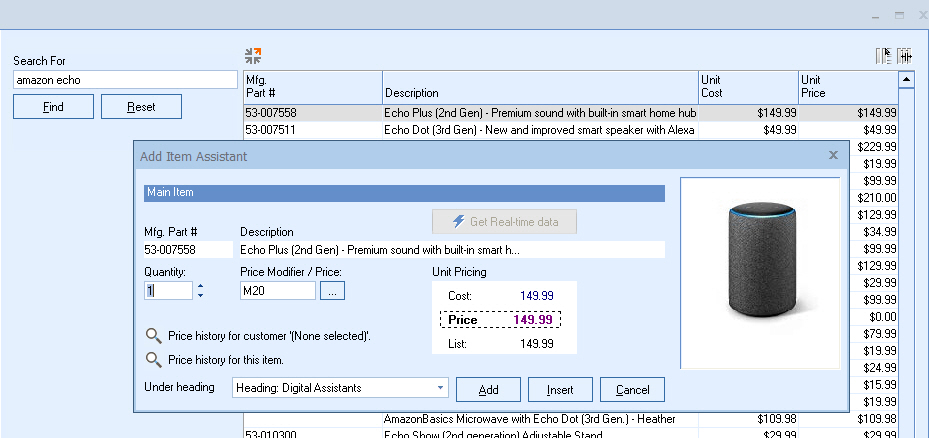 Search and build quotes for products available on Amazon Business within QuoteWerks Product Lookup. You can easily see pricing and product information, and if the item is Business Prime eligible.
QuoteWerks integrated purchasing makes it easy to create Purchase Orders and send them directly to your Amazon Business account. You will receive an email confirmation from Amazon Business once your order has been confirmed and received by Amazon Business. You can also check your order status through your Amazon Business account.
Search and build quotes for products available on Amazon Business within QuoteWerks Product Lookup. You can easily see pricing and product information, and if the item is Business Prime eligible.
QuoteWerks integrated purchasing makes it easy to create Purchase Orders and send them directly to your Amazon Business account. You will receive an email confirmation from Amazon Business once your order has been confirmed and received by Amazon Business. You can also check your order status through your Amazon Business account.
April 3, 2019
Build Release: v5.4 Build 4.11. Some Highlight features are Amazon Business Integration, SugarCRM 9.0 Support, and more. See the complete list of features.
April 1, 2019
Feature Spotlight: Documents Bar and Side-by-Side Documents
 The new QuoteWerks Documents Bar will display any current open documents (up to 10) and enable you to switch between documents by simply clicking on the document name. You're also able to cycle through the documents using the keyboard shortcut of CTRL+TAB keys.
Holding down the CTRL key and clicking on a document on the documents bar will position the current document and the document you clicked on next to each other making it easy to compare or copy and paste between two documents. Holding down CTRL+SHIFT and clicking on a document on the documents bar will do the same, but will also maximize the main QuoteWerks window.
The new QuoteWerks Documents Bar will display any current open documents (up to 10) and enable you to switch between documents by simply clicking on the document name. You're also able to cycle through the documents using the keyboard shortcut of CTRL+TAB keys.
Holding down the CTRL key and clicking on a document on the documents bar will position the current document and the document you clicked on next to each other making it easy to compare or copy and paste between two documents. Holding down CTRL+SHIFT and clicking on a document on the documents bar will do the same, but will also maximize the main QuoteWerks window.
March 22, 2019
Build Release: v5.4 Build 3.12. Some Highlight features are Zoho CRM Integration, Documents Bar, Document Side-by-Side, Autosave interval setting, and more. See the complete list of features.
January 29, 2019
Build Release: v5.4 Build 2.02. Some Highlight features are SugarCRM bi-directional Datalink, Purchasing Enhancements, Autotask link to QuoteWerks Web Documents, and more. See the complete list of features.
November 26, 2018
QuoteWerks Version 5.4 Release

Search and Find
Search line items in the quote to quickly find specific descriptions, prices, quantities, missing price modifiers, and much more. Filter by a specific column to search only that column in the document.
Group Price Override
Manually override the automatically calculated Grouped Price price to provide a "cleaner" looking price for the group simply by typing in the new amount. This is useful when, for example, your grouped bundle total is $5,043.23 and you would like to present it to the customer as a "cleaner looking" $5,000.00".
Sort and Organize
Sort line items on the Document Items tab in the currently open document by ascending or descending, sort items in a group. Sort a selection of contiguous or non-contiguous line items.
Bi-Directional DataLink Support
For Autotask, MS Dynamics CRM, SugarCRM and ConnectWise Manage users you can now use the DataLink feature to write information from QuoteWerks into the CRM/PSA opportunity such as notes, custom text information, and much more.
Integration to ClarityWerks
This new web-based collaboration tool streamlines communications for each document in a single location. Users can post comments, add documents, invite specific users, and much more.
CRM and PSA Support Updates
Support for ACT! 21, Maximizer CRM 2019, Sugar CRM 8.2, ConnectWise 2018.6, and Microsoft SQL Server 2019.
Payment Type Surcharges and Discounts
Support for up to seven different payment options (Credit Card, eCheck (ACH), Check, Wire Transfer, and two custom options). Customize text of the options, add a surcharge or discount, set default payment options and much more!
QuoteValet Updates
New "Dismiss All" button for the inbox, new "View QuoteValet Users" button on the Logged In Users window, and ability to receive email notifications indicating total number of times a customer has viewed a document.
Microsoft Word Macro Document Support
DOCM files are supported in the Deliver window for QuoteWerks. These can be used for creating Cover, Literature, and Layout documents that utilize Microsoft Word Macros.
Stripe Payment Support for QuoteValet
The payment gateway Stripe is now a supported merchant for QuoteValet users. Users can now set Stripe as their payment gateway to collect payments for their QuoteWerks documents via QuoteValet.
Shipping Enhancements
Added column for extended shipping amount, an option to use extended shipping amount column, an option to set shipping price for items in a product database, and ability to save a shipping template in the FedEX and UPS integration.
View QuoteValet License Allocation
QuoteValet users can now see which users are currently using QuoteValet licenses and in QuoteValet Insight you can see which users tried to log in, but could not because no licenses were available.
New Zoho Integration
QuoteWerks now supports Zoho CRM! This integration enables users to search for contacts, create and update deals, upload quote attachments into Zoho CRM, and full DataLink support.
Documents Bar and Side-by-Side Documents
The new QuoteWerks Documents Bar will display any current open documents (up to 10) and enable you to switch between documents by simply clicking on the document name. You're also able to cycle through the documents using the keyboard shortcut of CTRL+TAB keys.Holding down the CTRL key and clicking on a document on the documents bar will position the current document and the document you clicked on next to each other making it easy to compare or copy and paste between two documents. Holding down CTRL+SHIFT and clicking on a document on the documents bar will do the same, but will also maximize the main QuoteWerks window.

Quote Amazon Sourced Products and Submit Orders with Amazon Business
Place electronic orders directly with Amazon Business from QuoteWerks! Search for items in the Amazon Business product source and place orders for those items through the QuoteWerks Purchasing Window directly with Amazon Business.
Email Template Improvements
Email templates now include To, CC, and BCC options for the templates. Users are also able to select other users’ templates, making it easier than ever to share email templates across departments and similar job roles.
New QuoteValet Activity Notifications
Activity notifications have been expanded to include more actions from QuoteValet including Payment Failed, Customer Intends to Pay, Comment posted by Sales Rep, Expired Quote Viewed. Keep everyone in the loop with activity notifications!
Act! Integration - New Features!
The ACT! integration has been completely re-written to add new features such as linking all attachments and follow ups to the opportunity, the ability to rename any activity created by QuoteWerks, ability to integrate with ACT! while ACT! is not running, and many more.
Enhanced Etilize Integration
The QuoteWerks Product Content Subscription (Etilize) now offers an "In Stock Recently" checkbox to limit only items that have had stock within the last 24 hours. Additionally, the integration has been upgraded to return results faster as well as two new columns on the Etilize search window (List High and List Low). September 10, 2018
Build Release: v5.3 Build 6.06. Some Highlight features are ConnectWise Opportunity Ship To / Bill To Support, QuickBooks Online Payment Receipts, and more. See the complete list of features.
August 14, 2018

Announcement: QuoteWerks Web - Salesforce.com Integration
 This update includes:
This update includes:
- Salesforce.com Contact Search
- Salesforce.com Opportunities
- Salesforce.com Products
August 8, 2018
Build Release: v5.3 Build 5.07. Some Highlight features are Maximizer CRM On-Premise, Open Document search by any item field, Expanded Find Quoted Item functionality, Additional Custom Fields for Products, and more. See the complete list of features.
June 14, 2018
Build Release: v5.3 Build 4.09. Some Highlight features are Improved Payment Options, QuoteValet ACH, Submit Credit Application support for GreatAmerica and Ingram Micro Lease-IT!, Reckon Accounts Desktop, Print Layout file name generation, and more. See the complete list of features.
June 11, 2018
Feature Spotlight: Payment Options
 Use Payment Options on your documents to easily collect payments from your customers through QuoteValet. By utilizing Payment Options you can simplify how customers can pay you and offer a variety of payment options.
You can specify that a % or fixed amount surcharge or discount be applied to the quote when that particular payment option is selected. Useful, for example, in charging the customer a 3% surcharge if they pay by credit card, or a 3% discount if pay by check, or a $15 fee if pay by wire transfer. There is also an option to automatically disable a payment method, for example, credit card when the quote total is over, for example, $3000.
Use Payment Options on your documents to easily collect payments from your customers through QuoteValet. By utilizing Payment Options you can simplify how customers can pay you and offer a variety of payment options.
You can specify that a % or fixed amount surcharge or discount be applied to the quote when that particular payment option is selected. Useful, for example, in charging the customer a 3% surcharge if they pay by credit card, or a 3% discount if pay by check, or a $15 fee if pay by wire transfer. There is also an option to automatically disable a payment method, for example, credit card when the quote total is over, for example, $3000.
May 4, 2018
Build Release: v5.3 Build 3.20. Some Highlight features are Maximizer CRM Live, ConnectBooster Payments, Additional Custom Fields on the Workbook, Line Item ExtendedShippingAmount, Email address selection options, and more. See the complete list of features.
April 26, 2018
Announcement: QuoteWerks Web - Autotask Integration
This update includes:
This update includes:
- Autotask Contact Search
- Autotask Opportunities
- Autotask Products
- Autotask Services
March 20, 2018
Announcement: QuoteWerks Web - ConnectWise Manage Integration
This update includes:
This update includes:
- ConnectWise Contact Search
- ConnectWise Opportunities
- ConnectWise Products
- ConnectWise Tickets
January 23, 2018
Build Release: v5.3 Build 2.02. Some Highlight features are API enhancements, ConnectWise functionality, Item Attributes, multi-select print elements,and more. See the complete list of features.
November 27, 2017

Simple Labor
Include labor charges with line items! Link a labor charge as a line item to a parent item so that when the parent's item is changed, the labor quantity automatically changes with it.
Section Headers
Easily organize your quote into sections to breakdown your quote into project phases, physical locations, item categories and more. Separate the document into visually appealing and easy to read sections with automatic subtotals.
Line Item Quantity Linking
Link item quantities to each other using the Set Dependent Quantity feature. You can link a parent item to one ore more child items and when the parent's quantity is changed, the child items will automatically be updated to keep the original quantity ratio.
Updated Summary Lines
Summary Lines can now display subtotals from sections in addition to totaling items. This is especially useful for displaying totals from a particular Section Header such as monthly, annual, etc. recurring revenue items.
Required and Optional Items on Edit Product Screen
Create and edit required and optional items directly from the Edit Product Window, simplifying using required and optional items in a more intuitive and efficient manner.
Dynamic Notes
When logging notes in the Dynamic Notes field, your username and time-stamp is automatically inserted. This makes it easier than ever to collaborate and leave notes on the document and know exactly when and by whom the note was added.
Opportunity Dashboard - Groups and All
The QuoteWerks Opportunity Dashboard now displays all of the opportunities for a particular group of users, in addition to individual users. This provides an easy way to quickly report on all open, closed/won, and lost opportunities in the team's sales pipeline without having to run complicated reports.
Open Document Window - Group Filter
Searching for documents in QuoteWerks is now easier! Find documents by drilling down by a particular group or specific rep that prepared the document in QuoteWerks.
Required and Options Items' Quantities Linked to Parent
Required and Optional items now support the link quantity feature so they can also be linked to the master item.
Static Items for Bundles and Required Items
Build Bundles and Required Items without having to create the items in the Product Database. Users can now add items to bundles and required items without having to first create the item in the product database.
New Flat UI
We've refreshed the interface of QuoteWerks to have a more modern look and feel with new icons. August 23, 2017
Announcement: QuoteValet Mobile Refresh - August 2017
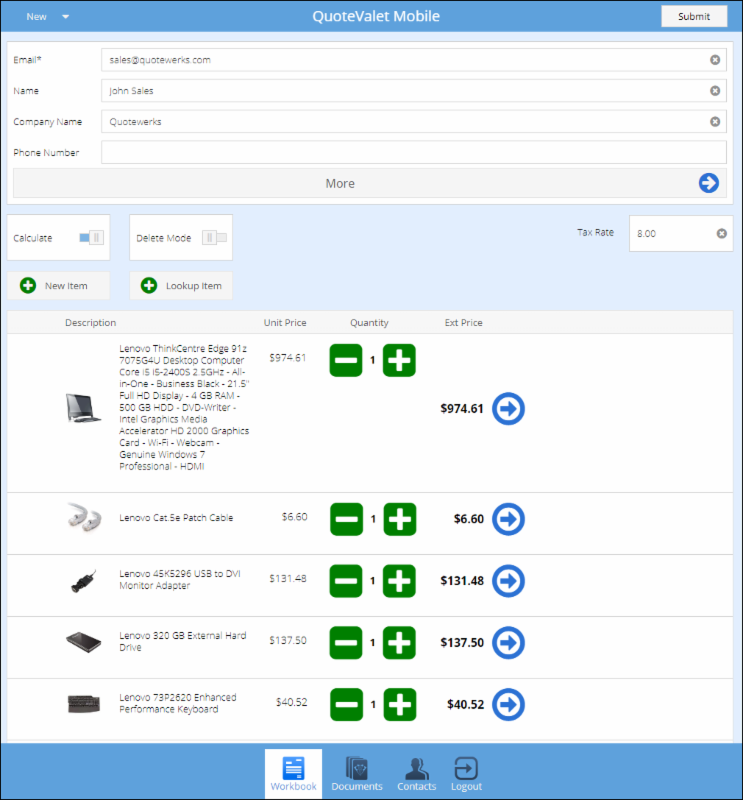 This update includes:
This update includes:
- Autotask contacts support
- An interface refresh
- Support for ConnectWise REST API
- UI issue fix when scrolling through multiple templates
August 12, 2017

Feature Spotlight: QuoteValet Videos
 QuoteValet supports videos for any document uploaded to QuoteValet. Your YouTube videos can be displayed on the QuoteValet document. Single or multiple videos can be displayed for a document as well as videos for individual line items. QuoteValet also supports default videos for every type of document (quotes, orders, invoices) created in QuoteWerks so users do not have to remember to manually include videos on documents.
QuoteValet supports videos for any document uploaded to QuoteValet. Your YouTube videos can be displayed on the QuoteValet document. Single or multiple videos can be displayed for a document as well as videos for individual line items. QuoteValet also supports default videos for every type of document (quotes, orders, invoices) created in QuoteWerks so users do not have to remember to manually include videos on documents.
August 8, 2017
Build Release: v5.2 Build 8. Some Highlight features are QuickBooks Online, Windows Authentication Login, QuoteValet Video Support, and more. See the version 5.2 Announcement.
New Video: How to Use Agreements in ConnectWise.
July 1, 2017
Tip: Did you know that you can drag and drop items in the Quote Workbook?
June 6, 2017
Build Release: v5.2 Build 6. Some Highlight features are Real-Time Ingram Micro Leasing, ConnectWise Enhancements, ability to Modify Purchasing PO templates, and more. See the version 5.2 Announcement.
April 17, 2017
Build Release: v5.2 Build 3. Some Highlight features are International Dell Punchout Integration, Etilize UK Upsell and Similar Items, Leasing Enhancments, and more. See the version 5.2 Announcement.
February 14, 2017
New Video: Version 5.2 Release Webinar.
January 26, 2017
November 11, 2016
QuoteWerks Version 5.2 Release

Licensing and Security Enhancements
Administrators can now force user logouts, especially useful when a user locks their machine and leaves for the weekend or when admins want to install updates. Users can see what other users are currently logged in and licensing events are now recorded such as login and logout events.
Dell Premier Punchout Orders - Credit Card Payment
Dell Premier Partners with Punchout credentials placing orders with Dell can now use credit card for payment in addition to terms.
Leasing Enhancements
There is now an option on the Lease Payment Calculator window to "Include Monthly recurring in lease payment" and more options to control the display of the leasing options on your quote.
Real-time leasing integration with Ingram Micro
Calculate your Ingram Micro Lease-IT financing options with a click of a button through the new QuoteWerks Ingram Micro Lease-IT Integration.
ConnectWise REST API Integration
New ConnectWise integration utilizing the ConnectWise REST API. Additionally, support added for ConnectWise 2017.5, 2017.4, and 2017.3.
QuoteWerks Commands
Create, edit, and customize system settings by running multiple commands simultaneously to automate changes inside QuoteWerks.
Exclude Etilize Results
Limit specific items from the Etilize search result for any items that have been discontinued, are outdated, or you simply don't sell.
Layout Designer Upgrade
Ensure your QuoteWerks documents are fully branded! Customize your QuoteWerks Layouts with the exact text color used for your documents in QuoteWerks and never worry about branding again.
Track Approvals
In QuoteValet Insight, you can see all documents that are approved, not approved, or pending approval on the Approvals tab.
Purchasing Enhancements
Modify the HTML PO template that is used when emailing or saving a PO as a PDF from the Purchase Orders tab of the Purchasing Window. You can easily modify the email template itself that controls what the email looks like.
QuickBooks Online
QuoteWerks now integrates with QuickBooks Online in addition to QuickBooks Desktop! This integration enables users to export their QuoteWerks documents to QuickBooks Online as Estimates, Invoices, and Sales Receipts, includes item support, purchase orders, and much more!

Multiple Shopping Cart Templates
Users can now have more than one QuoteValet Order Template used by the QuoteValet Shopping Cart. When uploading a new Order Form template to QuoteValet you can choose which of the available Order Form Templates to use.
November 3, 2015
QuoteWerks Version 5.1

Auto Save - Don't Lose Your Work
Life happens. Network and Internet connections disconnect. Windows Update reboots your PC overnight. You get so engrossed in your work and you forget to save. QuoteWerks Auto-save protects your work.
Control Your Output Like Never Before
The printing system has been significantly enhanced. You can now have primary and multiple secondary layouts. You now can control the order in which all of the print elements are assembled to create the final presentation to your client.
Matrix Style Product Comparison for Etilize Users
Easily compare products sourced from Etilize. Then, quickly de-clutter and remove comparison results that are not available from your distributor(s) and/or not in stock.

Etilize Support for Bundles and Configurations
Create and add items from Etilize to Bundles and Configurations.
Email Purchase Orders from QuoteWerks Purchasing
Combine partial or complete won orders to create a single Purchase Order for your vendor. Deliver the PO via an inline email or save as a PDF.
Streamlined Microsoft Word Merging
Word Merging no longer requires Microsoft Word to be on your computer and the time it takes to generate the Word document has been reduced from minutes to seconds.
Tech Data Quote Management
View, search, open, and import Tech Data created quotes into QuoteWerks.
Management Report Exporting
Export Management Reports to delimited text files (CSV or .txt) and select which fields to export.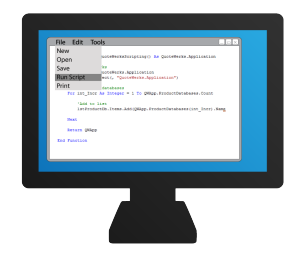
Run Scripts from Custom Menus
You can now run a script on demand by clicking on a custom menu. Scripts can perform custom actions on the currently open QuoteWerks document. November 7, 2014
QuoteWerks Version 5.0

QuoteWerks Opportunities Dashboard
Sales reps have the ability to track their progress with quota in the current month and historically. Managers have the ability to see all of their sales reps metrics in one place. Gain insight into the top selling products, quarterly progress, stage of quotes, and more!
Auto-Links
Use dynamically generated auto-links to quickly navigate to entities linked to your quote like contacts, opportunities, tickets, and activities.
Multiple Product Database Search
Search across multiple product databases, including QuoteWerks, ConnectWise, QuickBooks, and more.
Leasing Integration
Built-in lease payment calculation support, including a leasing integration with GreatAmerica Financial Services.
ConnectWise Sales Orders
QuoteWerks now converts sales opportunities to ConnectWise Sales Orders.
Dell Integration
The QuoteWerks Dell integration enables Dell Premier Partners with Punchout credentials, the ability to import quotes, create order requisitions, and even place orders with Dell. October 8, 2013
QuoteWerks Version 4.9
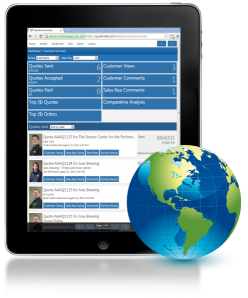
QuoteValet Insight
Gain insight and have mobile access to your QuoteValet Executive Dashboard, Leaderboard, Inbox, Peer Reviews, and Approvals, anywhere, anytime from any web device like your phone, tablet, or PC.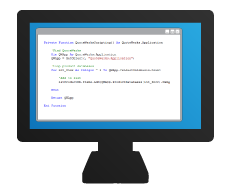
QuoteWerks Scripting
QuoteWerks now has built-in VB scripting in the Corporate Edition which enables you to write code to extend the functionality of QuoteWerks. Do special validations, check for combinations of items, and more.
Undo / Redo
QuoteWerks is the only quoting software with multi-level Undo and Redo. There are 10 levels of undo. Sometimes the simple things are the best.
QuoteWerks Dashboard
The QuoteWerks Dashboard gives a high-level overview of your total dollar amount and number of quotes and orders from the current month, last month, and two months ago. You can also see quotes expiring within the next week and even handle ConnectWise quote-request notifications.
Purchasing Sourcing
When selecting items for purchasing, you can obtain current pricing and availability and change vendor sourcing with the Product Content Subscription right before placing your order, ensuring that you order from the lower price vendor that has stock.

Purchase Orders
Purchase Orders can be created in QuoteWerks that are electronic orders or manually created.
Active Quotes Panel
When creating a new quote and selecting the contact you are creating the quote for, any active quotes for that contact will automatically be displayed in the Active Quotes Panel. This ensures that a colleague hasn't already created a quote for the prospect.
Real-time Tech Data SAP Quote Retrieval
As a result of the collaboration between QuoteWerks and Tech Data, QuoteWerks retrieves quotes created by Tech Data sales reps directly from Tech Data's internal SAP system.
ConnectWise Solutions
Place Electronic Orders with QuoteWerks and have the Purchase Orders flow seamlessly to ConnectWise. Use your CRM for Quoting and ConnectWise for Orders. Initiate a new quote from a ConnectWise (Mobile) Opportunity. November 14, 2012
QuoteWerks Version 4.8

QuoteValet Shopping Cart
Create online order forms with the QuoteValet Shopping Cart. Use them to automate customer re-orders or receive paid orders from a promotional email blast.
Procurement Tracking
Our complete Distributor Integration retrieves your pricing & availability, places electronic orders and tracks your shipments, serial numbers, & receiving.
Azure Cloud Hosted Product Database
Our new Microsoft Azure integration enables you to host your QuoteWerks Product Databases in the cloud.
PartLocatorTM
It can be tough keeping up with all the new parts on the distributor websites. Now, QuoteWerks provides you with ALL the parts from D&H, Tech Data, Ingram Micro, & SYNNEX with the Product Content Subscription.
Negotiated Pricing
You have the flexibility to override the standard real-time price with your special negotiated price when submitting an online order.
FedEx & UPS Integration
Our shipping integration with FedEx and UPS enables you to obtain real-time shipping quotes from your carriers, & serial numbers.
Document Audit Trail
Audit Trail Tracking provides the history of key event changes to the document, who changed it and when.
Recurring Groups
Grouped Bundles on the quote can be converted to a single recurring monthly revenue amount. All of the individual items in the bundle are totaled and then you can set an Annual Percentage Rate (APR) and a Term like 24 months at a 20% APR. This feature can be used for Hardware as a Service (HaaS) quoting.
Price Rounding
Present rounded prices to your customers. Easily round your prices when calculating from cost or list.
Import Tech Data Sales Rep Quotes
Import the Price Quotation spreadsheet your Tech Data sales rep emails you in a single click. Another QuoteWerks Original. November 17, 2011
QuoteWerks Version 4.7

Collect Credit Card Payments from Customers
QuoteValet 1.3 now includes Credit Card processing. Collect deposits, progress payments, balances, and payments flow seamlessly into QuickBooks. QuoteValet is the online quote delivery and acceptance vehicle for QuoteWerks. QuoteValet is a more robust way to deliver quotes to your customers and prospects. QuoteValet is an additional Subscription.
QuoteValet Mobile
The QuoteValet add-on subscription for QuoteWerks gives you the flexibility to create quotes on the go. QuoteValet Mobile enables you easily create quotes on your iPad or any HTML5 compatible tablet or browser. Imagine being able to create quotes in minutes and email it to your customer while still in your customer's office.
Use your Payment Gateway
QuoteValet 1.3 payment processing is available for over 80 gateways including QuickBooks Merchant Services, Authorize.net, PayPal, and more.
Up sell with Ease
Etilize 2.0 now presents spec sheets and accessories, enabling you to up sell your customers, generating more revenue.
Etilize UK
Etilize 2.0 adds support for UK QuoteWerks users in IT and AV industries!
No More Wasting Time Looking Up Sales Tax Rates
Tax Rate Lookup service is now included free in the Real-Time Module. Retrieve sales tax rates for your customer's zip code & city.
Enhanced QuickBooks Integration
The QuickBooks integration now creates Purchase Orders, Payments from QuoteValet 1.3 flow seamlessly into QuickBooks, and QuickBooks Custom fields (estimates/invoices/sales orders/POs, items, etc) are now supported.
Mass Email
Send the same email out to multiple recipients without the recipients being able to see each other's email addresses or names.
Associate Pictures with items "on-the-fly"
You can now manually associate a picture with a line item on the Documents Items Tab of the QuoteWerks workbook. Previously, this would only happen through Etilize or through associating a picture in advance in the product database.
Automatically attaches PDFs in your CRM/PSA
QuoteWerks now attaches a PDF of your quote/proposal automatically to your CRM. This new feature is supported in all of our native CRM/PSA integrations, which include: ACT!, Autotask, ConnectWise, GoldMine, Outlook, Outlook BCM, MS CRM, Maximizer 10+, salesforce.com, SalesLogix, and SugarCRM.
New Inbox Tab on QuoteValet Dashboard
The new Inbox tab on the QuoteValet Dashboard is designed to help you stay on the top of all your pending quotes by providing one place to see all new notifications. The inbox tab will display only new notifications, giving you the flexibility to see all important notifications in one place.
Enhanced QuoteValet Reporting
The QuoteValet reporting functionally has been enhanced and can be found on the new Reporting Tab on the QuoteValet dashboard. The QuoteValet Reporting allows you to filter your pending quotes to easily see new opportunities and keep track of details. The QuoteValet document activity history is now color coded to easily distinguish between customer and sales rep activities.
©1993-2024 Aspire Technologies, Inc.
407-248-1481 (9am-5pm ET M-F)
Please Wait...