407-248-1481

QuoteWerks Built-In Contact Database
-
 OverviewThis video will walk you through an overview of the QuoteWerks Built-in Contact Database.
Create Winning Quotes and Proposals
Enhance your quoting experience by utilizing QuoteWerks as your CPQ software solution to streamline the quote and proposal process, giving you a better chance to win every opportunity and deal.
Use QuoteWerks, sales quoting and proposal software solution, as a tool in your sales process.
If you do not use a contact manager (CRM) that QuoteWerks integrates with or would prefer not to use a contact manager with QuoteWerks, QuoteWerks has a built-in contact database that allows you to store your contact information.
Contacts can be manually added or imported from a tab or comma delimited file.
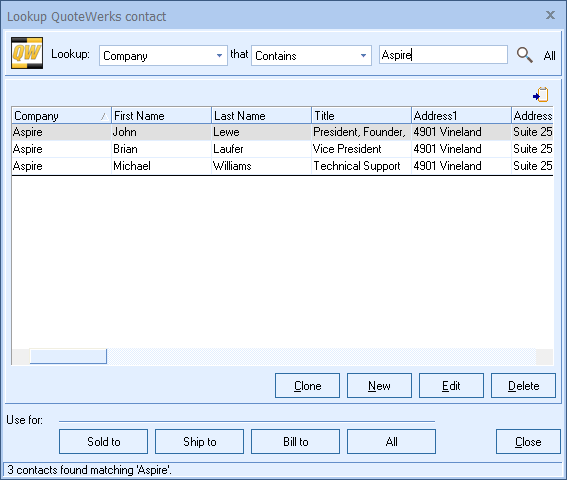
QuoteWerks lets your search the database for a contact to use in the quote
From our Sold To / Ship To tab of the QuoteWerks quote workbook,
you can search the contact database for a contact by name, company
name, last name, email, or phone number. QuoteWerks will fill in
the contact information in the quote by pulling the contact
information from the contact that you searched for. You will
never have to re-type your customer information.
QuoteWerks pulls other contact information into the quote
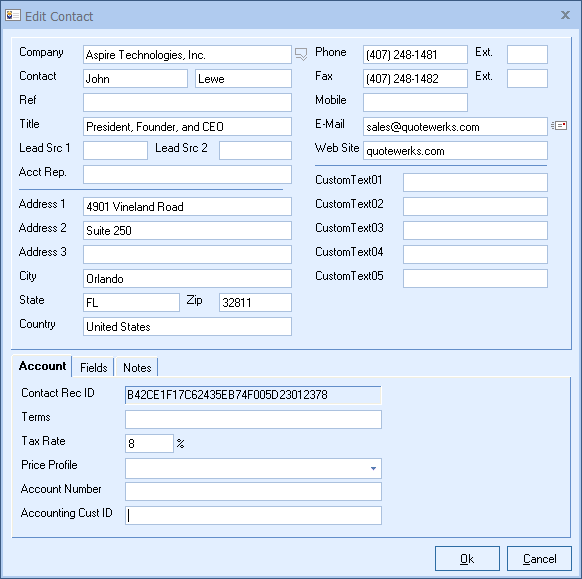
When you select the contact to use in the quote, our innovative DataLink feature can automatically pull other information from the database into the quote such as customer terms, customer sales tax rate, customer profile etc. Customer profiles can be used by QuoteWerks to determine the appropriate pricing a particular customer should receive.QuoteWerks prints information pulled from other contact fields
QuoteWerks has a built-in print layout designer that allows you to customize the look of your quote. The print layout designer also allows you to easily insert data fields from the contact database into the QuoteWerks print layout. Then, when you print the quote, QuoteWerks will pull data from the contact fields that you inserted into the print layout resulting in a printed quote that includes information from your contact. This feature is different from the DataLink feature (described above) in that this extra data is pulled from the contact and printed, but not saved with the quote. When you need to save the information pulled from the contact into the quote, you would use the DataLink feature. So, for example, if you are using a field in to store the contact’s assistant’s name, you can insert that field into the print layout so that when the quote is printed, the assistant’s name will be printed on the quote, but not saved with the quote.QuoteWerks can pull lookup list information from the contact
Many of the fields in QuoteWerks have a lookup list option. When you press the F2 key while in one of these fields, QuoteWerks will display a list of values that you can choose for the field. You can create a macro value that pulls information from a field in
in the contact record. For example, if you press the F2 key while in the terms field in QuoteWerks, QuoteWerks will display a list of terms options that you have previously entered. You can create a new option that retrieves a value from a field in
stored in the contact that you use to store your terms.
Productivity Feature: Company AKA
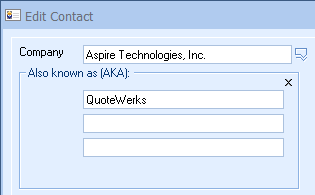
The QuoteWerks contact database has Company AKA feature. This lets
you specify up to 3 "Also Known As" (AKA) aliases for each
company record. When searching for a contact by company
name, if the search phrase finds a match in the Company,
CompanyAKA1, CompanyAKA2, or CompanyAKA3 field, that record
will be returned in the results. There are many fantastic
ways to use this feature which you will quickly find
very useful. For example, a company like "Center for
Computer Resources" when asked for their company name may
reply with "CCR". If you search your database for CCR you
will of course not find it, because the company's full name
is "Center for Computer Resources". Using the new company
name aliasing feature, you can set CompanyAKA1="CCR". That
way you will find their record if you type in either "Center
for Computer Resources" or "CCR". Here is another way to use
the Aliasing feature. You may use contact management
software "GoldMine". The company that makes "GoldMine" is "FrontRange
Solutions, Inc.". If you want to search your database to
look for the phone number for GoldMine support, you will
most likely remember the name "GoldMine" and not "FrontRange
Solutions, Inc." In this case, you can set the
CompanyAKA1="GoldMine". That way when you search for
"GoldMine" it will pull up "FrontRange Solutions, Inc."
Building on this, you could also store the name of your
GoldMine reseller in CompanyAKA2, so that when you search
for "GoldMine" QuoteWerks returns the contact information
for both the company that makes GoldMine and the reseller
that services your GoldMine installation. Another really
great use for the Aliasing feature is to record company
parent and child relationships. A company may have its own
particular name like "Aspire Technologies, Inc.", but its
parent company is "Lewe Enterprises". You may have "Aspire
Technologies, Inc." listed in your database, but when they
call you, they say their name is "Lewe Enterprises". In this
case, you can set the Company="Aspire Technologies, Inc.",
and CompanyAKA1="Lewe Enterprises". Another use would be
simply to use the Alias as a nickname. Another use is when a
company changes their company name. You can put the old name in
CompanyAKA1, and update the Company field with the new name.
This way, you will find the record when you search for the
old or current company name. This is particularly useful
when someone who has been with the company for a long time
may initially announce themselves as working for an old
company name either accidentally or they assume that your
records have not been updated.
Productivity Feature: Context Ref
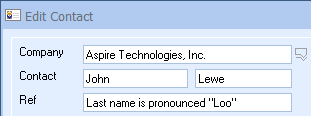
The QuoteWerks contact database has a ContextRef feature.
This ContextRef field is located right below the Contact field.
This can be used to make a contextual note about this person
that is always displayed right by the contact name (rather
than buried in the Notes tab). You can use this to store all
sorts of useful information like "he is our new property
manager", "met him at EHExpo", "met him golfing with John". You can also put things like
"is a guy" or "is a girl" for help with unisex names. And of
course you can use it to indicate how to pronounce someone's
name, like for "Lewe" you could say "pronounced Loo".
Productivity Feature: Notes
The Notes field has a simple, but useful productivity feature. Pressing CTRL-I while anywhere on the Edit Contact window will switch to the Notes tab and insert the logged in user name, date, and time at the beginning of the notes field. It will insert, for example, "*** (John Lewe) *** May 10, 2010 at 9:45 am".
Top Notes
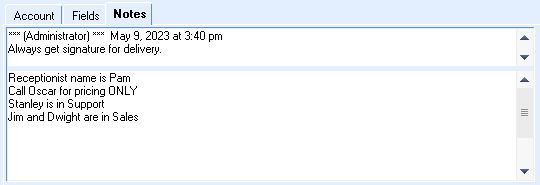
The QuoteWerks contact database has a TopNotes feature.
The Notes tab is divided into two
sections - TopNotes and Notes. Typically as you add new
notes to the Notes field, the older notes get pushed further
and further down. Often, important information then becomes
buried in the middle of lots of notes. The TopNotes will
always stay on the top. This is especially useful for
recording things like warnings, notices, and instructions
that you always want to see. It can be things like user
id's, account numbers, instructions on how to navigate
through their phone system like prompt [5] then [7], then
[2]. You can also store information like "Always get
signature for delivery. Always use their FedEx# 1234-5678-9.
Typically we speak with John or Brian when accepting orders.
If the customer asks for pricing, only Mike knows the
special pricing they negotiated."