407-248-1481

The QuoteWerks integration with Microsoft Outlook Overview

The combination of QuoteWerks and Microsoft Outlook makes it easier to provide quotes and proposals to prospective customers.
-
 Integration OverviewThis video demonstrates the QuoteWerks integration with Outlook.
Create Winning Quotes, Estimates, and Proposals with Microsoft Outlook
Enhance your sales process by implementing QuoteWerks as your CPQ solution to streamline the quote and proposal process, giving you a better chance to win every opportunity.
Use QuoteWerks, sales quoting and proposal software solution, as a tool in your CPQ and Quote-to-Cash sales process.
Compatibility
QuoteWerks integrates with Microsoft Outlook 2019, 2016, 2013, 2010, 2007, 2003, XP, 2000, and 97.QuoteWerks pulls Outlook contact information into the quote
From our Sold To / Ship To tab of the QuoteWerks quote workbook, with a simple click of a button, QuoteWerks will fill in the contact information in the quote by pulling the contact information from the contact that is currently open in Outlook. You will never have to re-type your customer information.QuoteWerks pulls additional Outlook contact information into the quote
When you select the Outlook contact to use in the quote, our innovative DataLink feature can automatically pull other information from Outlook into the quote such as customer terms, customer sales tax rate, customer profile etc. Customer profiles can be used by QuoteWerks to determine the appropriate pricing a particular customer should receive.QuoteWerks lets you search the Outlook database for a contact to use in the quote
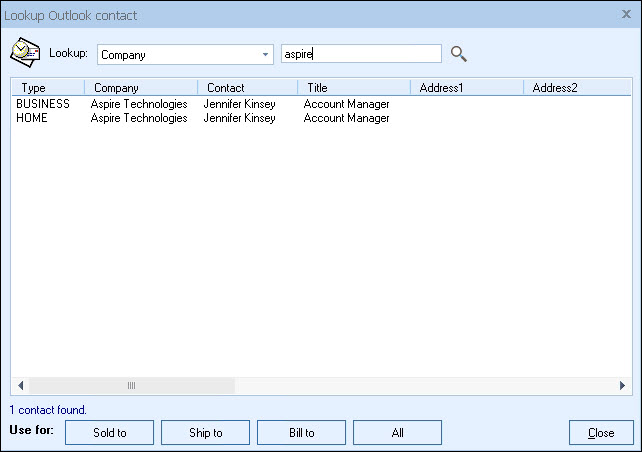
You can search your Outlook database for a contact by company, last name, or phone number and pull the contact information into the quote. QuoteWerks can also search Exchange Public Folders, enabling you and your colleagues to search for and use your shared Outlook contact data. You will never have to re-type your customer information again. Both business and home address entries are supported.
QuoteWerks prints information pulled from other Outlook fields
QuoteWerks has a built-in print layout designer that enables you to customize the look of your quote. The print layout designer also enables you to easily insert data fields from Outlook into the QuoteWerks print layout. Then, when you print the quote, QuoteWerks will pull data from the Outlook contact fields that you inserted into the print layout resulting in a printed quote that includes information from your Outlook contact record. This feature is different from the DataLink feature (described above) in that this extra data is pulled from Outlook and printed, but not saved with the quote. When you need to save the information pulled from Outlook into the quote, you would use the DataLink feature. So, for example, if you are using a field in Outlook to store the contact's assistant's name, you can insert that Outlook field into the print layout so that when the quote is printed, the assistant's name will be printed on the quote, but not saved with the quote.
QuoteWerks creates Linked Documents in Outlook
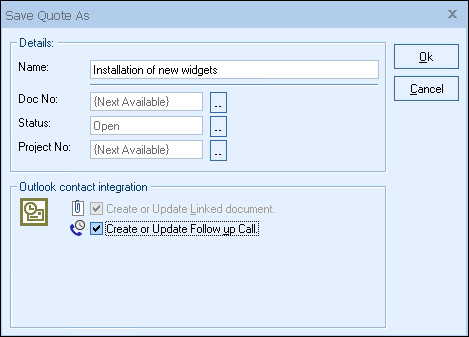
When saving a quote, QuoteWerks can automatically create a linked document record in Outlook under the Activities tab as a Journal Entry.
When you are viewing a contact record in Outlook under the Activities tab, you will see all the quotes that you have done for this contact. You can double-click on the the Journal Entry, and Double-click on the linked document to open the quote in QuoteWerks. Also from the Journal pane in Outlook, you can quickly find these Journal Entries by typing the quote number or name (or a portion of) in the search box.
QuoteWerks schedules Follow up calls in Outlook
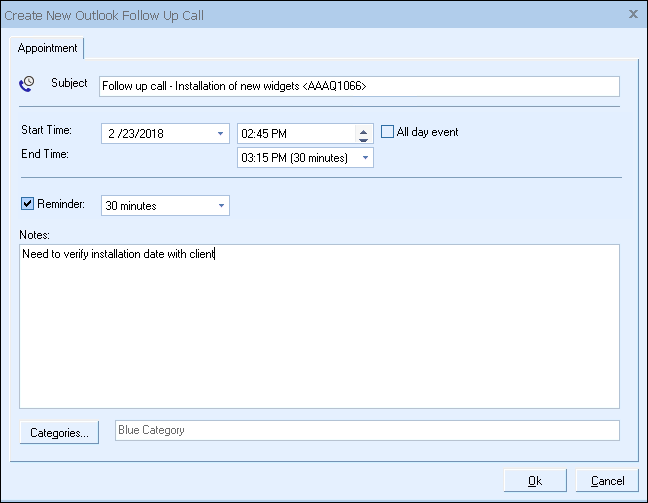
When saving a quote, QuoteWerks can automatically schedule a follow up call in Outlook as an Appointment Entry. If you already have a follow-up call scheduled for this quote, QuoteWerks will display the existing follow-up call so you can update it. By scheduling follow up calls, you increase your chances of closing the sale!
QuoteWerks logs emails in Outlook
QuoteWerks can send emails using the built-in SMTP email client or Outlook. If you choose to use Outlook for sending emails from within QuoteWerks, these emails will be logged in Outlook. This is very useful for resending quotes.
QuoteWerks can pull lookup list information from Outlook
Many of the fields in QuoteWerks have a lookup list option. When you press the F2 key while in one of these fields, QuoteWerks will display a list of values that you can choose for the field. You can create a macro value that pulls information from a field in Outlook. For example, if you press the F2 key while in the terms field in QuoteWerks, QuoteWerks will display a list of terms options that you have previously entered. You can create a new option that retrieves a value from a field in Outlook that you use to store your terms.
Get started with QuoteWerks today
Start Free Trial
No credit card required.
©1993-2024 Aspire Technologies, Inc.
407-248-1481 (9am-5pm ET M-F)
Please Wait...